Advanced Unit Converter – 50+ Units Conversion Tool Guide.
Advanced Unit Converter – 50+ Units Conversion Tool Guide. In today’s digital world, accurate unit conversion is very important for students, professionals, engineers, developers, and even daily users. Different countries, industries, and systems use different measurement units, which makes conversion confusing and time-consuming. To solve this problem, Advanced Unit Converter by freetoolscraft.com is designed as a powerful, fast, and easy-to-use online tool.
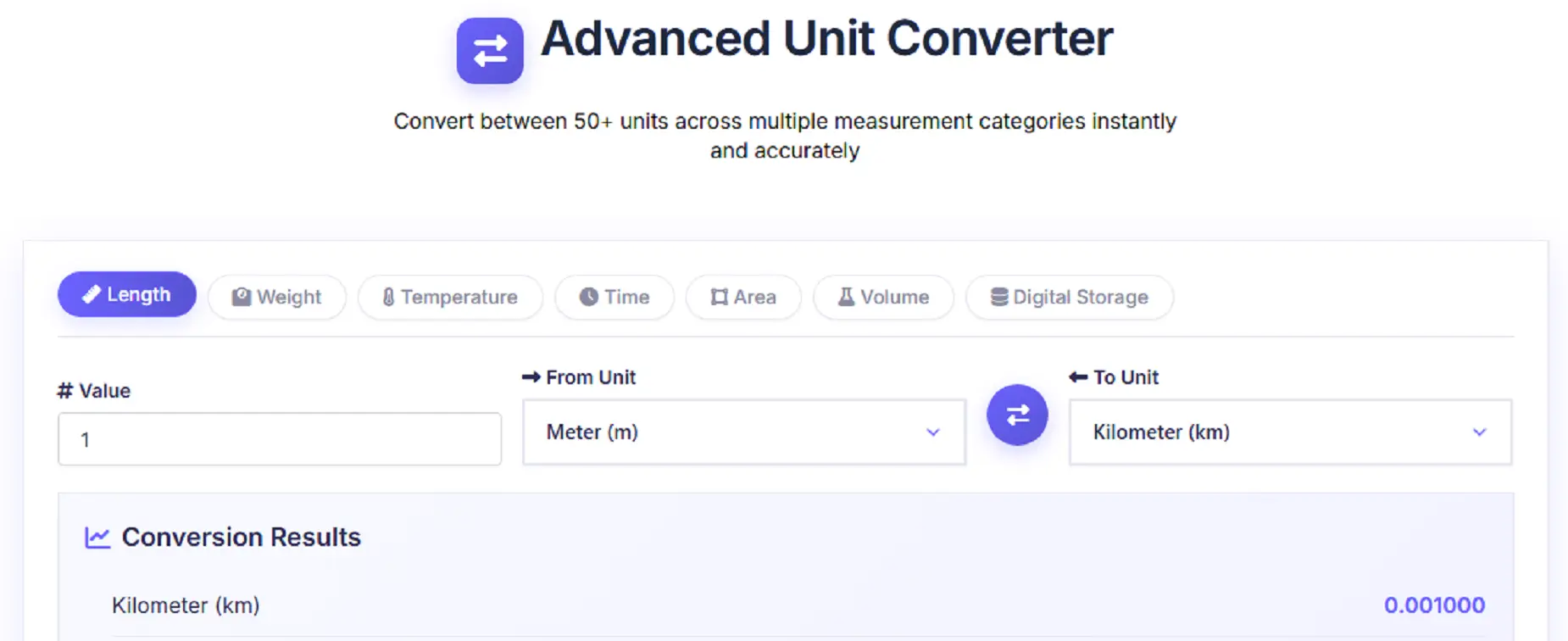
This advanced unit converter allows you to convert values between 50+ units across multiple categories like Length, Weight, Temperature, Time, Area, Volume, and Digital Storage. The tool works completely online, without any installation, login, or technical knowledge.
Whether you want to convert meters to kilometers, kilograms to pounds, Celsius to Fahrenheit, or MB to GB – this tool gives instant and accurate results.
👉 Tool Link: https://freetoolscraft.com/advanced-unit-converter/
Who Uses Advanced Unit Converter & Where It Is Useful ?
The Advanced Unit Converter is useful for a wide range of users across different fields. Below are some common use cases:
Students & Teachers
Students studying science, mathematics, engineering, or computer science often need quick unit conversions for assignments and exams. Teachers also use unit converters while preparing examples and study material.
Engineers & Professionals
Civil engineers, mechanical engineers, electrical engineers, and architects frequently deal with different measurement systems. This tool saves time by providing accurate conversions instantly.
Developers & IT Professionals
Digital storage conversions like KB to MB, MB to GB, GB to TB, etc., are very common in the IT field. This tool makes digital unit conversion simple and error-free.
Travelers & International Users
When traveling or dealing with international data, users often need to convert miles to kilometers, pounds to kilograms, or gallons to liters. This tool helps in understanding measurements globally.
Daily & General Users
From cooking recipes to fitness tracking and daily calculations, this unit converter is helpful for everyone who wants quick and reliable results.
How To Use Advanced Unit Converter (Step-by-Step Guide)
Using the Advanced Unit Converter on freetoolscraft.com is extremely simple, even for beginners.
Step 1: Open the Tool
Visit the official tool page:
👉 https://freetoolscraft.com/advanced-unit-converter/
Step 2: Select a Category
At the top, you will see multiple tabs like:
Length
Weight
Temperature
Time
Area
Volume
Digital Storage
Click on the category you want to use.
Step 3: Enter the Value
In the “Value” input box, enter the number you want to convert.
Step 4: Choose From & To Units
Select the From Unit and To Unit using the dropdown menus.
You can also use the swap button (⇄) to quickly reverse units.
Step 5: Get Instant Results
The tool automatically shows conversion results in real time, including additional reference conversions for better understanding.
No reload, no submit button, no delay – everything updates instantly.
There are many unit converter tools available online, but freetoolscraft.com stands out for several reasons:
✅ Multiple Categories in One Tool
Instead of using separate tools, you get all major unit conversions in one place.
✅ Real-Time & Accurate Results
Conversions happen instantly with precise formulas and standard conversion factors.
✅ Beginner-Friendly Interface
Clean design, simple layout, and easy controls – perfect for beginners and non-technical users.
✅ No Login & No Installation
100% online tool. No signup, no software, no downloads required.
✅ Works on All Devices
Fully responsive – works smoothly on mobile, tablet, and desktop.
✅ Completely Free
No hidden charges, no limits. Use it anytime for free.
Frequently Asked Questions (FAQs)
1. Is Advanced Unit Converter free to use?
Yes, the Advanced Unit Converter on freetoolscraft.com is 100% free with no usage limits.
2. Does this tool work on mobile devices?
Yes, the tool is fully responsive and works perfectly on mobile phones and tablets.
3. How many unit categories are supported?
Currently, the tool supports 7 major categories including Length, Weight, Temperature, Time, Area, Volume, and Digital Storage.
4. Are the conversion results accurate?
Yes, the tool uses standard conversion formulas and accurate unit values for reliable results.
5. Do I need to create an account to use this tool?
No, there is no registration or login required.
6. Can I convert digital storage units like MB to GB?
Yes, the Digital Storage section supports conversions from bits to petabytes.
7. Is this tool suitable for students and beginners?
Absolutely. The interface is simple and designed especially for beginners and students.