
7 Powerful Benefits of Using This Advanced Favicon Generator (Free)
In today’s competitive online landscape, even the smallest visual details matter. A favicon—that tiny icon you see in browser tabs, bookmarks, and mobile home screens—may seem insignificant, but it’s a crucial piece of your brand’s digital identity. A well‑designed, professional favicon builds trust, improves recognition, and makes your site look polished and credible. However, creating one that works perfectly across all devices and platforms can be surprisingly tricky.
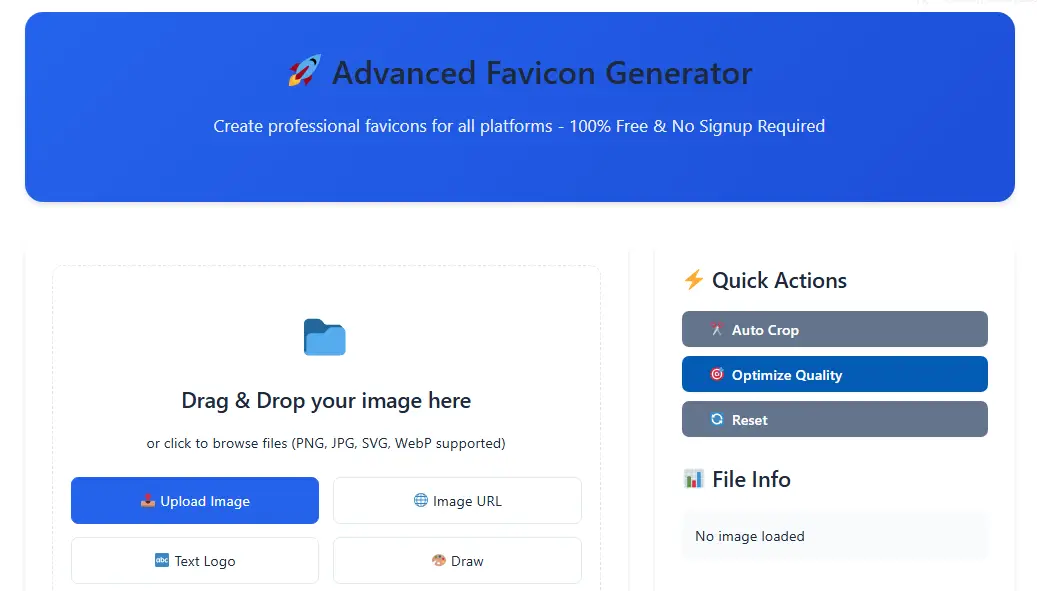
This is where our Advanced Favicon Generator comes in. It’s a free, online tool designed to eliminate the complexity and technical hurdles of favicon creation. Whether you’re a blogger, a small business owner, or a web developer, you can now generate a complete set of optimized favicons in minutes—without any design skills, expensive software, or signup required.
The Real-World Problems with Creating Favicons
Technical Complexity: A modern website needs more than one favicon. It requires multiple files in different formats and sizes (like ICO for Windows, PNG for browsers, Apple Touch icons for iOS) to display correctly everywhere. Manually resizing and converting images is time‑consuming and error‑prone.
Platform‑Specific Requirements: Each browser and operating system has its own preferred specifications. What works in Chrome might look blurry on an iPhone home screen. Ensuring compatibility across all platforms is a major headache.
Privacy Concerns: Many online tools upload your image to a server for processing. If you’re working with a pre‑launch logo or proprietary branding, this raises legitimate privacy and security issues.
Cost and Accessibility: Professional design software is expensive, and hiring a designer for a simple favicon is often overkill. Many “free” online generators add watermarks or limit downloads unless you pay.
Our tool is built entirely to address these exact issues. It’s a browser‑based application, which means all processing happens directly on your computer. Your images never leave your device, guaranteeing 100% privacy and security. It’s also completely free—no watermarks, no subscriptions, no hidden fees.
Most importantly, it handles the technical heavy lifting for you. You provide a source image, and the tool produces a complete, ready‑to‑use favicon pack tailored for all major platforms. Let’s explore how it accomplishes this.
Core Features and How to Use Them
1. Flexible Input Methods
You don’t need a finished logo to start. The tool offers four ways to create your base image:
Upload Image: Drag and drop your existing logo or graphic (supports PNG, JPG, SVG, WebP).
Image URL: Simply paste a link to an image hosted online.
Text Logo: Instantly generate a clean logo using up to 3 characters. Perfect for initials or acronyms.
Drawing Canvas: A built‑in drawing tool for creating something from scratch (basic implementation).
Who should use this?
This is ideal for anyone, from those with a ready‑made logo to users who need to create a simple brand mark on the fly.
2. Built‑In, Real‑Time Editor
Once your image is loaded, you can fine‑tune it directly within the tool. No need for a separate graphics editor.
Transform: Adjust rotation and scale to perfectly position your design.
Background Control: Change the background color or make it transparent with a single click.
Shape & Effects: Modify the border radius for rounded corners, add padding, and adjust brightness/contrast for optimal clarity.
Why is this useful?
It allows you to optimize your design specifically for the small canvas of a favicon. What looks good at full size may need cropping or brightening to be effective at 16×16 pixels.
3. Multi‑Format & Multi‑Platform Output
This is the core strength of the tool. You can select exactly which formats you need:
ICO (32×32): The traditional format for Windows browsers.
PNG 16×16 & 32×32: Standard for modern browsers.
PNG 180×180: The required Apple Touch Icon for iOS and iPadOS home screens.
SVG: For future‑proof, scalable vector icons.
WebP: A modern, highly compressed format for faster loading.
Who should use this?
Web developers will appreciate the complete set. Bloggers and business owners can use the “Platform Presets” (like “WordPress” or “PWA”) to automatically select the right formats for their site.
4. Live Preview Across Contexts
You shouldn’t have to guess how your favicon will look. The tool provides a live preview in different contexts:
Browser tab
Mobile home screen
Bookmark bar
Dark mode interface
This immediate feedback ensures your design is legible and effective in every scenario.
5. Ready‑to‑Use Implementation Code
Generating the files is only half the battle; you need to add the correct HTML code to your website. The tool provides copy‑ready code snippets for:
Basic HTML
WordPress (to add to your
functions.phpfile)PWA (Progressive Web App) manifests
React‑based applications
This eliminates the risk of making errors in the crucial <head> section of your site.
6. One‑Click Batch Download
After selecting your formats, a single click on “Download All Selected Formats” bundles everything into a .zip file. The archive includes all your favicon files and an implementation.html file with the code, making deployment incredibly straightforward.
7. Platform‑Specific Presets & Quick Actions
To save even more time, the sidebar offers:
Quick Actions: Buttons for auto‑cropping, optimizing image quality, and resetting the editor.
Platform Presets: Pre‑configured format selections for WordPress, PWA, iOS, and Android with one click.
Advanced Tools: Options for batch processing multiple images, checking your existing favicon’s “health,” and creating animated favicons (conceptual features).
Step‑by‑Step Guide to Creating Your Favicon Pack
Visit the Tool: Navigate to the Advanced Favicon Generator on FreeToolsCraft.
Input Your Design: Use the upload, URL, or text tool to get your base image into the editor.
Edit and Refine: Use the sliders and options to adjust the image until it looks perfect in the live preview panels.
Select Your Formats: Choose the formats you need. When in doubt, the “WordPress” preset is a great starting point for most websites.
Download and Implement: Click the download button, extract the ZIP file, and use the provided code to upload the images and update your site’s HTML.
Frequently Asked Questions (FAQ)
Q1: What is the main advantage of this Advanced Favicon Generator over others?
A1: The key advantage is that it’s a 100% client‑side tool. All image processing occurs in your web browser, meaning your files are never uploaded to a server. This guarantees maximum privacy, security, and speed. Plus, it’s completely free with no limitations.
Q2: Do I need to create an account or pay to download my favicons?
A2: Absolutely not. The Advanced Favicon Generator on FreeToolsCraft is free, with no sign‑up required. You can generate and download as many favicon packs as you need without any watermarks or restrictions.
Q3: Which image format should I choose for my favicon?
A3: For broad compatibility, we recommend generating at least these three: ICO (for legacy Windows), PNG 32×32 (for modern browsers), and PNG 180×180 (for Apple devices). Our tool’s “WordPress” preset selects this optimal combination for you. You can learn more about image formats on Wikipedia to understand their differences.
Q4: Can I use this tool to edit an existing favicon?
A4: Yes. You can upload your current favicon, use the editor to adjust its colors, size, or background, and then re‑export it in all necessary formats. It’s a great way to refresh an old design.
Q5: Is the generated code search engine friendly?
A5: Yes, the provided HTML code follows standard best practices and helps search engines like Google properly identify and display your favicon across their services, contributing to a professional search presence.
Conclusion
A professional favicon is a small investment with a significant return in terms of brand credibility and user experience. Our Advanced Favicon Generator removes all the technical and financial barriers, putting a powerful, private, and completely free design tool at your fingertips.
Whether you’re launching a new site or giving your existing one a polish, creating the perfect multi‑platform favicon set is now a task that takes minutes, not hours. For other handy webmaster utilities, you may also find our Image Compressor or PDF to Image Converter useful.
For Your Feedback
We are constantly working to improve our tools based on user experience. If you have suggestions or face any issues while using this tool, feel free to contact us at freetoolscraft@freetoolscraft.com.