
7 Powerful Benefits of Using an Advanced Image DPI Converter Online (Complete Guide)
What Is Image DPI and Why Does It Matter?
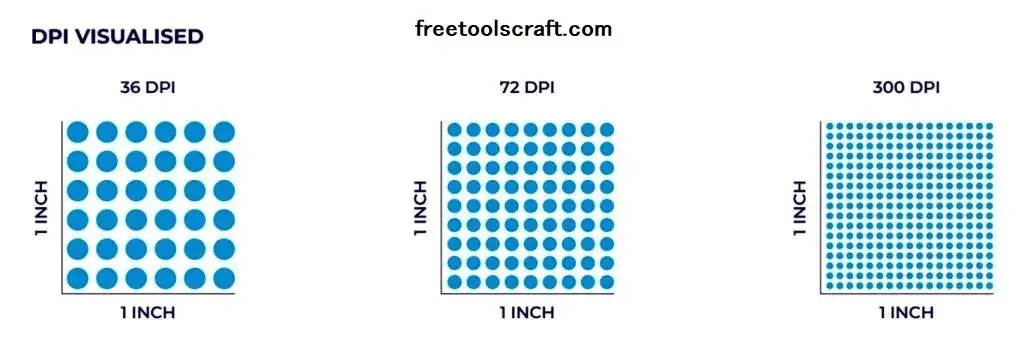
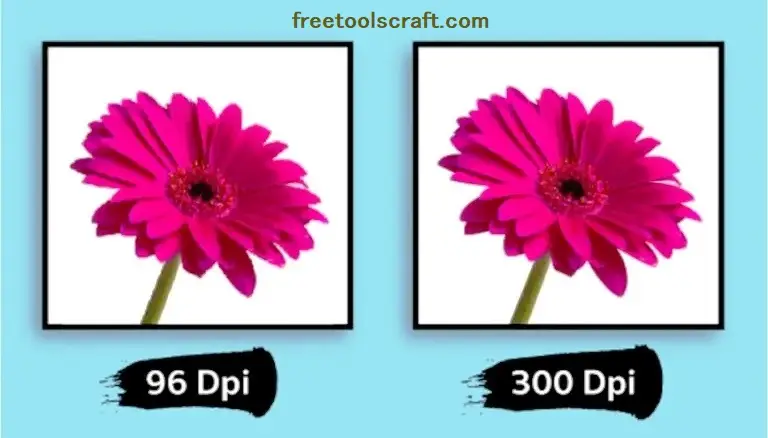
DPI stands for Dots Per Inch, and it defines how many dots (or pixels) are printed within one inch of an image. In simple words, DPI controls image clarity and sharpness, especially when printing. A higher DPI means better print quality, while a lower DPI is suitable for digital screens like websites and social media.
Image DPI plays a very important role in printing, graphic design, photography, marketing materials, and professional documents. For example:
Designers use high DPI images for magazines and posters
Photographers need 300 DPI or more for photo prints
Students and office users require correct DPI for reports and presentations
Website owners prefer lower DPI images for faster loading
That’s where an Advanced Image DPI Converter becomes essential. It helps you change DPI without damaging image quality and gives full control over dimensions, quality, and resolution.
Who Uses an Image DPI Converter and Where Is It Used?
An online Advanced DPI Converter is widely used across many industries and daily tasks:
Graphic Designers – For posters, brochures, flyers, and banners
Printers & Publishers – For magazines, books, and fine art prints
Digital Marketers – To optimize images for ads and social media
Web Developers – To balance quality and performance
Students & Office Professionals – For assignments and official documents
Tools like the one available on freetoolscraft.com are designed to work directly in the browser, making them perfect for beginners as well as professionals.
How To Use the Online Advanced DPI Converter (Step-by-Step)
Using an Advanced Image DPI Converter is very simple, even if you are a beginner. Follow this complete guide:
1. Upload Your Image
You can upload your image in two easy ways:
Drag & Drop the image into the upload area
Click “Select Image” and choose a file from your computer
Supported formats include PNG, JPG, JPEG, WEBP, and BMP.
2. View Image Information
After uploading, the tool instantly shows:
File name and file size
Original image dimensions (width × height in pixels)
Detected original DPI
This helps you understand your image before conversion.
3. Select Target DPI
Choose your desired DPI from the dropdown or quick options:
72 DPI – Websites & social media
96 DPI – Computer screens & presentations
150 DPI – Flyers & brochures
300 DPI – Photo prints & magazines
600 DPI – Fine art & high-end publishing
4. Adjust Dimensions (Optional)
You can manually control width and height in pixels.
Advanced options include:
Aspect Ratio Lock to prevent distortion
Preset ratios like 1:1, 4:3, 16:9, 3:2
Auto-calculation based on DPI using smart formulas
This ensures precise resizing without quality loss.
5. Set Quality Level
Use the Quality & Sharpness slider:
90–100% → Best quality (larger file size)
70–80% → Smaller size with minor quality loss
Recommended: 95% for best balance
6. Convert & Download
Click “Convert & Download”, wait a few seconds, and your image will download automatically with a clear filename including DPI and dimensions.
7. View Conversion Details
You can also see:
Original vs target DPI
New dimensions
Scale factor
Estimated file size
Final resolution in megapixels
Advanced Features That Make This Tool Powerful
Smart DPI Recommendations for web, print, and professional use
High-quality interpolation for clean upscaling
Real-time calculations while adjusting settings
Reset option to start fresh anytime
Mobile-friendly interface for touch devices
Privacy, Security & Performance
Your privacy is fully protected:
No server uploads
No data storage
All processing happens in your browser
This makes the tool safe, fast, and reliable—especially when using trusted platforms like freetoolscraft.com.
FAQs – Advanced Image DPI Converter
1. What is the best DPI for printing images?
300 DPI is ideal for high-quality photo and professional printing.
2. Can I change DPI without losing image quality?
Yes, using advanced interpolation and quality controls prevents quality loss.
3. Is this DPI converter free to use?
Yes, it is completely free and works online without registration.
4. Does changing DPI increase image size?
Higher DPI can increase pixel dimensions and file size, depending on settings.
5. Which DPI is best for websites?
72–96 DPI is perfect for web and faster loading.
6. Are my images uploaded to a server?
No, all processing happens locally in your browser.
7. Can I use this tool on mobile devices?
Yes, it is fully responsive and mobile-friendly.
8. What formats are supported?
PNG, JPG, JPEG, WEBP, and BMP formats are supported.
Need Help or Suggestions?
If you have any questions, feedback, or suggestions, feel free to contact us through our website. We’re always happy to help you improve your workflow with free and powerful tools.
Conclusion:
An Advanced Image DPI Converter is a must-have tool for anyone working with digital or printed images. With full DPI control, dimension adjustment, quality preservation, and complete privacy, it delivers professional results effortlessly. Try it today on freetoolscraft.com and experience smart image optimization the right way 🚀